
Listen to article
There is no universal Google Ads budget that works for every business. A viable monthly budget depends on your average CPC, conversion rate, target conversions, customer value, allowable CPA or CAC, and how much data the account needs before you can make sound decisions.
In other words, the question is not just how much to budget for Google Ads. The better question is: how much do you need to spend to generate enough relevant clicks, meaningful conversions, and reliable performance data without exceeding your business economics?
This guide breaks down how to plan a realistic Google Ads monthly budget using quick planning ranges, budget formulas, cost drivers, allocation examples, pacing checks, B2B-specific adjustments, and clear signals for when to increase, hold, or reduce spend.
What Is a Good Google Ads Budget?
Quick answer: A good Google Ads budget is the amount that can generate enough relevant clicks and meaningful conversions to evaluate performance while staying within your target CPA, CAC, or ROAS. The right number depends on CPC, conversion rate, search demand, sales cycle, margins, and how much data your team needs before making budget decisions.
A good Google Ads budget is not defined by one universal monthly amount. It is defined by whether the budget can support the business decision you need to make.
For a new account, that decision may be simple: can this campaign generate qualified interest from the right audience? For a more mature account, the decision may be more financial: can we increase spend without pushing CPL, CPA, or CAC beyond the target?
This is why the average Google Ads budget is rarely useful on its own. Two companies can spend the same amount and get very different outcomes because their CPCs, conversion rates, sales cycles, and customer values are different.
Use Three Budget Stages: Testing, Proving, and Scaling
Instead of asking for one “right” Google Ads budget, it is more practical to think in stages: testing, proving, and scaling.
Each stage has a different purpose. A testing budget is designed to validate the basics. A proving budget is designed to generate enough qualified conversions to optimize. A scaling budget is designed to increase investment only after performance and lead quality are stable.
|
Budget stage |
What the budget should answer |
What to look for |
What to avoid |
|
Testing |
Can this campaign generate relevant clicks and early conversions? |
Tracking accuracy, search intent, message-market fit, offer clarity, and early conversion behavior |
Testing too many campaigns, keywords, or markets at once |
|
Proving |
Can the campaign generate enough qualified conversions to optimize? |
CPL or CPA, conversion quality, lead source, sales feedback, early CAC signals |
Judging success by cheap clicks or raw form fills only |
|
Scaling |
Can more spend produce more business value without hurting efficiency? |
Stable CPL/CAC, acceptable lead quality, enough demand, sales capacity |
Increasing spend before tracking, quality, or profitability is reliable |
In the testing stage, the budget should be focused. The goal is not to cover every keyword, product, audience, or location. The goal is to learn whether a specific offer, market, and conversion path can produce the right kind of response.
In the proving stage, the budget needs to support enough conversion volume to make optimization useful. If the campaign only produces one or two conversions per month, it becomes difficult to separate real performance patterns from random variation.
In the scaling stage, the budget should only increase when the account has earned it. That means conversion tracking is reliable, CPL or CAC is within an acceptable range, lead quality is stable, and the business has enough sales or operational capacity to handle more volume.
Why Monthly Spend Ranges Vary So Much
Monthly spend ranges vary because Google Ads is shaped by auction pressure, search volume, geography, landing-page performance, and business economics.
The impact of each factor can be summarized as follows:
- CPC → Click volume
- Search volume → Available demand
- Geography → Market size and competition
- Deal value → Allowable acquisition cost
- Sales cycle → Speed of performance validation
- Landing-page conversion rate → Lead and sales volume
- Lead qualification → Revenue potential of conversions
That is why “what is a good Google Ads budget?” needs a different answer depending on the business model.
|
Business model |
Example planning scenario |
Why the required budget changes |
What to evaluate |
|
Local services |
A focused city-level campaign with a smaller service area |
Spend capacity may be lower, but high-intent searches can still be competitive |
Calls, bookings, cost per appointment, and close rate |
|
Lead generation |
A campaign built around demo requests, consultations, or quote forms |
Not every form fill has the same value, so qualification matters |
CPL, qualified-lead rate, sales acceptance, and CAC |
|
Ecommerce |
A campaign focused on direct purchases |
Budget needs to support enough purchase volume to evaluate revenue and margin |
ROAS, average order value, gross margin, and repeat purchase potential |
|
High-CPC B2B |
A campaign targeting expensive, high-intent commercial keywords |
CPCs may be higher and sales feedback may take longer |
Qualified leads, opportunities, pipeline value, close rate, and allowable CAC |
Before increasing or reducing spend, it is worth asking whether paid search is the right channel for the goal, the market, and the economics of the business. For a broader decision-making view, Scopic Studios’ guide on are Google Ads worth it can help teams evaluate paid-search investment in context.
How Google Ads Budgets Work: Daily Budget vs. Monthly Spend
A Google Ads monthly budget is usually planned at the business level but entered into the platform as an average daily budget. That distinction matters because Google Ads does not treat your daily budget as a strict daily cap.
Most campaigns use an average daily budget, which tells Google roughly how much you are comfortable spending per day over the course of a month. From there, Google may spend more on days with stronger demand and less on days with lower opportunity.
Average Daily Budget and Monthly Spending Limit
To convert a monthly Google Ads budget plan into a campaign-level daily budget, use Google’s 30.4-day monthly average.
Formula:
Monthly target ÷ 30.4 = average daily budget
Where:
- Monthly target = the amount you plan to spend in one month
- 30.4 = Google’s average number of days in a month
- Average daily budget = the daily campaign budget entered in Google Ads
Example:
If your monthly target is $6,080, your average daily budget would be $200.
$6,080 ÷ 30.4 = $200 per day
According to Google’s guidance on average daily budget, monthly spend can fluctuate day by day, but most campaigns still follow a monthly spending limit.
Why Daily Spend Can Exceed the Average
Daily spend can exceed the average because Google may prioritize days when search traffic is higher or when the system expects stronger performance. For most campaigns, Google’s monthly spending limit is 30.4 times the average daily budget, while the daily spending limit is usually two times the average daily budget.
This is why Google Ads budget pacing should be managed monthly, not judged by one unusually high or low day. The daily number helps control delivery, but the monthly limit is what keeps spend aligned with the broader budget plan.
How to Calculate Your Google Ads Budget
Learning how to calculate a Google Ads budget starts with one principle: work backward from the business outcome, not forward from a random monthly spend.
The most reliable approach is to calculate your budget from a few different angles, then compare the results. This helps you understand whether your planned spend can support the volume, quality, and economics your business needs.
The same framework also helps you understand how to determine a Google Ads budget before presenting the number to leadership or finance.
Method 1: Work Backward from Target Conversions
The simplest method is to start with the number of conversions you want and the cost you are willing to pay for each one.
Formula:
Monthly budget = target conversions × target cost per conversion
Where:
- Target conversions = the number of meaningful actions you want in one month
- Target cost per conversion = your acceptable CPA, CPL, or similar cost target
- Monthly budget = the estimated media spend required to reach that conversion goal
The key is defining “conversion” correctly. For an ecommerce company, a conversion may be a purchase. For a service business, it may be a booked call. For a B2B company, it may be a qualified lead, demo request, application, trial, or sales-accepted opportunity.
When reliable CRM data is available, use qualified outcomes instead of raw form fills. A campaign that generates 100 leads at a low CPL may look efficient in Google Ads, but if only 10 of those leads are qualified, the real cost per qualified lead is much higher.
Method 2: Work Backward from Clicks and Conversion Rate
The second method starts with the traffic needed to reach your lead or purchase goal. This is often the most useful method when you know your expected CPC and landing-page conversion rate.
Formula:
Clicks required = target leads ÷ landing-page conversion rate
Monthly budget = clicks required × average CPC
Where:
- Target leads = the number of leads, purchases, or other conversions you want
- Landing-page conversion rate = the percentage of ad clicks that become conversions
- Clicks required = the number of clicks needed to reach the conversion goal
- Average CPC = the estimated cost per click
- Monthly budget = the estimated media spend required
This method is useful because it shows when a seemingly reasonable budget may not be large enough to produce useful data.
Method 3: Work Backward from Revenue, ROAS, or CAC
For ecommerce, SaaS, high-ticket services, and mature lead-generation programs, revenue or customer economics may be more useful than lead volume alone.
Formula:
Maximum media budget = target revenue ÷ target ROAS
Or:
Maximum media budget = target customers × allowable acquisition cost
Where:
- Target revenue = the revenue goal connected to the campaign
- Target ROAS = the required return on ad spend
- Target customers = the number of new customers you want to acquire
- Allowable acquisition cost = the maximum amount you can spend to acquire one customer
- Maximum media budget = the highest media spend that still fits the business case
This method is especially useful when lead volume does not tell the full story. A campaign with a higher CPL may still be profitable if it produces better-fit leads, larger deals, stronger close rates, or higher lifetime value.
It is also important to separate media spend from total acquisition cost. Media spend is the money paid to Google for ad delivery. Total acquisition cost may also include PPC management, creative, landing-page work, tracking implementation, reporting, CRM tools, and other software costs.
Copyable Google Ads Budget Calculator Table
The table below can be copied into a spreadsheet and adjusted with your own numbers. It is not a substitute for campaign data, but it gives you a practical Google Ads budget calculator framework for planning.
|
Budget input |
What it means |
Formula or example |
|
Target conversions |
Monthly number of purchases, leads, booked calls, trials, or qualified opportunities |
30 qualified leads |
|
Average CPC |
Estimated cost per click |
$12 |
|
Landing-page conversion rate |
Percentage of clicks that become conversions |
5% |
|
Clicks required |
Target conversions ÷ landing-page conversion rate |
30 ÷ 0.05 = 600 clicks |
|
Estimated monthly budget |
Clicks required × average CPC |
600 × $12 = $7,200 |
|
Average daily budget |
Monthly budget ÷ 30.4 |
$7,200 ÷ 30.4 = $237/day |
|
Target CPA or CPL check |
Monthly budget ÷ target conversions |
$7,200 ÷ 30 = $240 |
|
Revenue or CAC check |
Compare spend against target ROAS, margin, or allowable CAC |
Confirm the economics still work |
A table like this helps answer a more useful version of “how much should I budget for Google Ads?” Instead of choosing a round number first, you can see whether the budget matches the conversion goal, CPC environment, and business model.
For B2B teams, this is also where external benchmarks can be useful as context. Scopic Studios’ guide to B2B cost per lead benchmarks can help support a qualified-lead budgeting example, but the final budget should still be based on your own conversion rates, lead quality, and customer economics.
Worked Examples for Different Business Models
The following examples are illustrative planning scenarios. They are not performance promises or universal recommendations.
|
Scenario |
Goal |
Assumptions |
Required clicks |
Estimated monthly spend |
Average daily budget |
|
B2B lead generation |
20 qualified leads per month |
$18 CPC and 4% click-to-qualified-lead conversion rate |
500 clicks |
$9,000 |
$296/day |
|
Ecommerce or direct response |
120 purchases per month |
$2.50 CPC and 3% purchase conversion rate |
4,000 clicks |
$10,000 |
$329/day |
In the B2B example, the company is not budgeting for raw form fills. It is budgeting for qualified leads. If CRM data shows that only half of form fills become qualified, the campaign needs to account for that gap before leadership evaluates CPL or CAC.
B2B example:
At $18 CPC and a 4% click-to-qualified-lead conversion rate, the campaign needs 500 clicks to generate 20 qualified leads.
20 ÷ 0.04 = 500 clicks
500 × $18 = $9,000 monthly budget
$9,000 ÷ 30.4 = $296 average daily budget
In the ecommerce example, the budget is tied to purchase volume. The ecommerce team would then check whether the expected revenue, average order value, margin, and target ROAS support that spend.
Ecommerce example:
If the goal is 120 purchases, the average CPC is $2.50, and the purchase conversion rate is 3%, the campaign needs 4,000 clicks.
120 ÷ 0.03 = 4,000 clicks
4,000 × $2.50 = $10,000 monthly budget
$10,000 ÷ 30.4 = $329 average daily budget
The B2B team would check whether qualified leads turn into opportunities and customers at an acceptable CAC. The ecommerce team would check whether purchase volume, average order value, margin, and ROAS justify the spend.
This is the practical value of calculating the budget from more than one angle. It prevents teams from treating Google Ads spend as a fixed marketing expense and reframes it as an investment tied to conversion volume, lead quality, revenue potential, and customer acquisition economics.
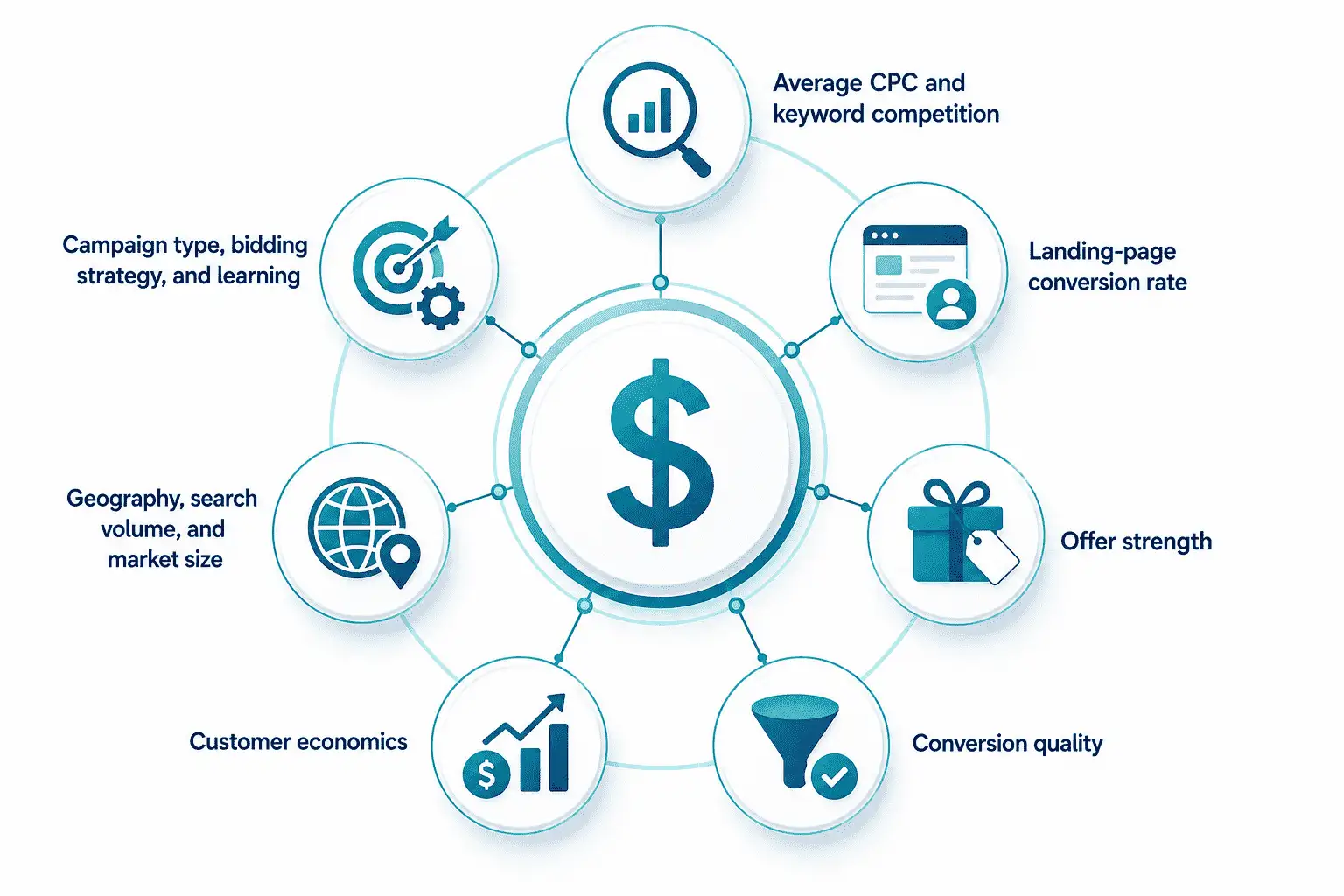
Seven Factors That Change How Much You Need to Spend
Once you know the basic formulas, the next question is how much to budget for Google Ads in your actual market. The answer depends on more than your target number of leads or sales. It depends on the cost of reaching the right audience, the likelihood that clicks will convert, and the value of the outcome after the conversion happens.
This is why the average Google Ads budget can be misleading. Benchmarks can help with directional planning, but they should not be treated as a forecast for your account. A cross-industry CPC average does not tell you what your highest-intent keywords will cost, how well your offer will convert, or whether the resulting leads will become profitable customers.
Use the factors below to pressure-test your monthly budget before increasing spend.
|
Factor |
Impact on budget |
What to check before increasing spend |
|
Average CPC and keyword competition |
Higher CPC means the same monthly budget buys fewer clicks |
Keyword intent, auction competition, expected CPC range, and whether expensive terms are tied to business value |
|
Landing-page conversion rate |
A stronger conversion rate reduces the number of clicks needed for the same lead or sales goal |
Page speed, message match, form friction, offer clarity, and conversion tracking |
|
Offer strength |
A weak offer can make even relevant traffic expensive to convert |
Whether the offer matches search intent and gives users a clear reason to act |
|
Conversion quality |
Cheap conversions can still be poor business outcomes |
Qualified-lead rate, sales acceptance, close rate, order quality, or revenue value |
|
Customer economics |
Higher-value customers can support a higher CPA or CAC |
Average order value, margin, repeat purchase, lifetime value, close rate, and target ROAS |
|
Geography, search volume, and market size |
Narrow markets may limit spend capacity; broad markets may require more budget |
Location performance, available search demand, and realistic lead or sales volume |
|
Campaign type, bidding strategy, and learning |
Automated bidding needs enough stable data to optimize effectively |
Conversion volume, conversion cycle length, bid strategy, and recent major changes |
What Is the Minimum Google Ads Budget?
A practical Google Ads minimum budget is not the lowest amount the platform allows. It is the lowest amount that can buy enough relevant clicks and conversions for your team to make a responsible decision.
That distinction matters because a campaign can technically run with a very small daily budget and still fail to generate enough data to evaluate performance. In that case, the problem is not always the channel, the keyword set, or the offer. Sometimes the budget simply cannot support the level of learning the campaign needs.
For a Google Ads budgeting beginners guide, this is one of the most important points to understand: “minimum” should be defined by decision quality, not platform access.
Define “Minimum” by Data, Not Platform Access
Google Ads may allow advertisers to enter very low daily budgets, but that does not mean every low-budget campaign can produce useful results.
A practical minimum should answer three questions:
- Can the budget buy enough relevant clicks?
- Can those clicks produce enough conversions to evaluate performance?
- Can the team judge conversion quality, not just conversion quantity?
If the answer is no, the budget may be too small for the market. A $1,000 monthly budget may create useful learning in a narrow, lower-CPC local campaign. The same budget may be too limited in a competitive category where each click costs significantly more and conversion feedback takes longer.
This is why “what is a good Google Ads budget?” and “what is the minimum Google Ads budget?” are closely related. A good budget does not need to be large for its own sake. It needs to be large enough to produce decision-quality data.
For outside context, Focus Digital’s 2025 analysis of 150+ Google Ads campaigns provides minimum viable budgets by industry. Those industry budget benchmarks can be useful for comparison, but they should not replace your own CPC, conversion-rate, geography, and customer-economics calculations.
Budget Viability Scenarios
The table below shows illustrative planning scenarios, not promises or fixed minimums. The goal is to show how the same monthly budget can behave very differently depending on CPC and conversion rate.
|
Sample monthly budget |
CPC scenario |
Estimated clicks |
Leads at 2% conversion rate |
Leads at 5% conversion rate |
What this may tell you |
|
$1,000 |
$3 low-CPC scenario |
333 clicks |
7 leads |
17 leads |
May be enough for a focused local or niche test if lead quality can be reviewed |
|
$1,000 |
$10 medium-CPC scenario |
100 clicks |
2 leads |
5 leads |
Likely limited data; useful only for a very narrow test |
|
$1,000 |
$25 high-CPC scenario |
40 clicks |
1 lead |
2 leads |
Usually too thin for confident optimization or scaling decisions |
|
$3,000 |
$3 low-CPC scenario |
1,000 clicks |
20 leads |
50 leads |
Can support stronger testing if traffic quality is relevant |
|
$3,000 |
$10 medium-CPC scenario |
300 clicks |
6 leads |
15 leads |
May be viable for a focused campaign with clear conversion tracking |
|
$3,000 |
$25 high-CPC scenario |
120 clicks |
2 leads |
6 leads |
Still limited for high-CPC categories unless the offer is very focused |
|
$7,500 |
$10 medium-CPC scenario |
750 clicks |
15 leads |
38 leads |
More useful for proving performance and optimizing by conversion quality |
|
$7,500 |
$25 high-CPC scenario |
300 clicks |
6 leads |
15 leads |
May begin to support decision-making in competitive markets |
A small budget can look reasonable until you translate it into click volume. If the budget only buys 40 clicks in a month, even a solid conversion rate may only produce one or two leads. That is usually not enough to understand whether the campaign is working.
On the other hand, a modest budget in a lower-CPC market can generate enough traffic to test search intent, offer strength, and conversion behavior. The key is not the dollar amount by itself. The key is whether the budget can generate enough relevant activity to support the decision you need to make.
When a Small Budget Can Still Work
A small Google Ads budget can still work when the campaign is intentionally narrow.
That usually means targeting a specific geography, focusing on a small set of high-intent terms, sending traffic to a strong landing page, and measuring one clear conversion action. The campaign should be built to answer one focused question, not to test every service, product, audience, and market at the same time.
Small budgets are most likely to be useful when:
- The target geography is limited and relevant
- The keyword set is small and high-intent
- The landing page matches the search intent closely
- The conversion action is clear and easy to complete
- The team can review lead quality, not just lead volume
- The test is focused enough to avoid spreading spend too thin
The better approach is to treat a small budget as a focused test. Choose the highest-priority offer, the clearest audience, and the strongest conversion path. Once that test produces enough evidence, you can decide whether to expand, hold, or reallocate the budget.
How to Allocate Your Google Ads Budget Across Campaigns
Google Ads budget allocation strategies should start with business value, not campaign variety.
The goal is not to fund every campaign type at once. The goal is to make sure the campaigns closest to meaningful conversions and revenue have enough budget to produce useful data.
A practical allocation plan usually answers three questions:
- Which campaigns are closest to revenue, qualified leads, booked calls, or purchases?
- Which campaigns protect existing demand, such as brand search?
- Which campaigns are tests and should be capped before they consume too much budget?
Once those priorities are clear, you can split the monthly budget across core campaigns, brand protection, remarketing, and controlled tests.
Prioritize the Campaigns Closest to Business Value
The first budget layer should go to the campaigns with the clearest connection to business outcomes.
Depending on the account, that may include:
- High-intent non-brand search campaigns
- Priority products or services
- Top-performing locations
- Campaigns tied to qualified leads, purchases, booked calls, or pipeline
- Search terms that show strong commercial intent
This does not mean every high-intent keyword deserves unlimited budget. It means the account should not underfund the campaigns most likely to produce valuable conversions while spreading spend across lower-priority experiments.
A simple rule helps: if a campaign is close to revenue or a meaningful conversion action, it should have enough budget to generate useful data. If it is exploratory, it should be capped and measured separately.
Protect Brand Demand Without Overfunding It
Brand search can be valuable because it captures people already looking for your company, product, or service. It can also help protect demand from competitors bidding on your name.
But branded campaigns should be treated as a controlled layer, not proof that the whole account is efficient.
Brand performance can look strong because the user already knows the company. That does not mean non-brand acquisition campaigns are performing at the same level.
When deciding how much budget to reserve for brand search, consider:
- How much branded search volume exists
- Whether competitors are bidding on your name
- How strong your organic visibility is
- Whether brand clicks are protecting high-value demand
- Whether branded spend is crowding out acquisition budget
Avoid using one universal percentage for every account. In some cases, brand spend may be small and stable. In others, it may need more protection because competitors are active or brand demand is commercially important.
Reserve a Controlled Test Budget
A healthy Google Ads budget should leave room for testing, but tests need boundaries.
Without a defined test pool, experimental campaigns can quietly absorb budget that should have gone to proven conversion paths.
A controlled test budget can be used for:
- New keywords
- New geographies
- New audiences
- New offers
- New landing pages
- New campaign types
Before launching a test, define three things:
- Budget cap: How much can this test spend before review?
- Success metric: Are you judging by CPA, CPL, qualified-lead rate, purchase volume, revenue, or opportunity quality?
- Decision rule: Will the test earn more budget, stay capped, pause, or be reallocated?
For example, a test might be limited to one market, one offer, one conversion goal, and a fixed monthly amount. If it meets the success threshold, it can earn more budget. If it does not, the spend can be paused or moved back into stronger campaigns.
Adapt the Framework for B2B Google Ads
For B2B teams, the question is not only how many leads the budget can generate. It is how many qualified leads, opportunities, and customers the budget can realistically support.
When deciding how to set a budget for a B2B Google Ads campaign, work backward from:
- Qualified leads
- Opportunity rate
- Close rate
- Sales cycle length
- Deal value
- Allowable CAC
Raw lead volume is not enough if many leads are poor fit, too early-stage, or unlikely to become pipeline.
This is also where sales feedback matters. A B2B campaign may need more time before quality is visible because the sales cycle is longer and opportunity data may lag behind the initial conversion.
For broader campaign setup, targeting, and landing-page guidance, Scopic Studios’ B2B Google Ads strategy guide explains how B2B teams should adapt the budget framework within a larger paid-search strategy.
Google Ads Budget Pacing: How to Stay on Track Each Month
Google Ads budget pacing is the process of checking whether your spend is moving in line with your monthly plan. It helps you avoid two common problems: spending too much before performance is clear, or underspending so much that the campaign never gets enough data.
A Google Ads monthly budget should not be judged by one unusually high or low day. Because daily spend can fluctuate, pacing should compare planned spend, actual spend, forecasted spend, and conversion quality over the month.
Set a Monthly Pacing Target
Start with a simple pacing formula. This gives you a baseline for whether spend is roughly on track.
Formula:
Expected spend to date = monthly budget × percentage of month elapsed
Where:
- Monthly budget = the total amount planned for the month
- Percentage of month elapsed = how much of the month has passed
- Expected spend to date = the amount you would expect to have spent by that point
Example:
If your monthly budget is $12,000 and 50% of the month has passed, expected spend to date is:
$12,000 × 50% = $6,000
Then compare that number with actual spend and forecasted spend. If actual spend is $6,300, the account may be close to target. If actual spend is $3,000 or $9,500, the team needs to understand why.
Use the Budget Report and Weekly Checks
Google’s Google Ads budget report can help you review cost to date, monthly forecast, and monthly spending limits. But pacing should not stop at spend alone.
A weekly pacing check should include:
- Cost to date
- Forecasted monthly spend
- Conversion volume
- CPL, CPA, or CAC
- Qualified-lead rate or purchase quality
- Campaign-level underspend or overspend
- Any recent budget, bid, or targeting changes
This is where budget pacing becomes more than accounting. If spend is on track but qualified leads are weak, the issue is not pacing. It may be targeting, offer fit, landing-page quality, or conversion tracking. If spend is low but conversion quality is strong, the campaign may need more search volume, broader coverage, or a budget review.
|
Pacing status |
What it may mean |
What to do next |
|
On track |
Spend, forecast, and performance are close to plan |
Keep monitoring weekly and avoid unnecessary changes |
|
Underspending |
The campaign may have limited search volume, restrictive targeting, low bids, or approval issues |
Check search demand, impression share, bid strategy, targeting, and campaign status |
|
Overspending |
Spend may be accelerating faster than planned, or daily fluctuations may be affecting delivery |
Compare actual spend with forecast, review conversion quality, and avoid cutting budget before diagnosing the cause |
Avoid Constant Budget Changes During Learning
Frequent or large budget changes can make performance harder to interpret and may destabilize automated bidding while the account is still learning. Google’s guidance on how budget changes affect spending limits explains that changing the average daily budget can affect how often ads are shown and how daily and monthly spending limits are calculated.
That does not mean budgets should never change. It means material edits should be intentional and documented.
Before changing the budget, note:
- What changed
- Why it changed
- When it changed
- Which campaigns were affected
- What performance signal triggered the change
- When the next review should happen
This makes it easier to separate normal campaign learning from the impact of budget edits. Good pacing is not about reacting to every daily swing. It is about keeping spend, forecast, conversion volume, and business quality aligned throughout the month.
When Should You Increase Your Google Ads Budget?
Knowing when to increase Google Ads budget is just as important as knowing how to calculate the starting number. More spend can help a strong campaign scale, but it can also amplify weak targeting, poor tracking, low-quality leads, or an offer that is not converting well enough.
Budget increases should be based on performance quality, not just platform prompts. A campaign being constrained by budget can be a useful signal, but it should not be the only reason to scale.
Before you scale: Make sure conversion tracking is reliable, qualified-lead or purchase quality is acceptable, CPL or CAC is within target, and your sales or operations team can handle more volume. A campaign being “Limited by budget” can be a useful signal, but it should not be the only reason to increase spend.
Increase Budget When Performance and Lead Quality Are Stable
Increase budget when the campaign has enough evidence to justify more spend.
That usually means:
- Conversion tracking is accurate
- CPL, CPA, or CAC is within the target range
- Qualified-lead rate or purchase quality is acceptable
- Campaigns are constrained by budget or missing profitable demand
- The sales team or operations team can absorb more volume
- Recent changes have had enough time to mature
Hold Budget When the Account Is Still Learning
Sometimes the best budget decision is to wait.
Hold the budget steady when the account does not have enough conversion data, when recent changes have not matured, or when the sales cycle delays quality feedback. This is especially important for B2B, high-ticket services, and longer consideration purchases where the first conversion does not immediately show whether the lead is valuable.
You may also want to hold budget when:
- A new bidding strategy was recently applied
- A landing page or offer was recently changed
- Conversion tracking was recently fixed or restructured
- Sales has not yet reviewed lead quality
- Early performance is promising but based on too little data
Holding the budget does not mean ignoring the account. It means giving the system and the business enough time to produce reliable signals before making a larger financial decision.
Reduce or Reallocate Before Cutting Everything
If performance is weak, the first move should not always be an account-wide budget cut.
A broad cut can reduce spend while leaving the same structural waste in place. If weak queries, poor locations, low-quality conversion sources, or underperforming campaigns keep receiving budget, the account may simply become a smaller version of the same problem.
Before cutting the full Google Ads budget, look for places to reallocate:
- Search terms with poor intent
- Campaigns with weak conversion quality
- Locations with high spend and low return
- Audiences or segments producing poor-fit leads
- Offers that attract volume but not revenue
- Campaigns where tracking is incomplete or unreliable
This is where Google Ads budget optimization strategies should focus on quality first. Reallocation is often more useful than a blanket reduction because it moves spend away from weak areas and toward campaigns with stronger business potential.
|
Signal |
Meaning |
Recommended action |
|
CPL/CAC is within target and lead quality is stable |
The campaign may be ready for more volume |
Increase gradually and monitor quality closely |
|
Campaign is “Limited by budget” |
There may be more available demand than the current budget can capture |
Check conversion quality, profitability, and sales capacity before scaling |
|
Spend is on pace but qualified-lead rate is weak |
The campaign may be generating volume without enough business value |
Improve targeting, offer fit, landing page, or qualification before increasing spend |
|
CPC is rising but conversion value is stable |
Competition may be increasing, but economics may still work |
Review margins, CAC, and ROAS before changing budget |
|
Recent changes were made |
Performance may still be settling |
Hold budget and review after more data comes in |
|
One campaign is wasting spend while others perform well |
The issue may be allocation, not total budget |
Reallocate from weak campaigns to stronger ones |
|
Sales cannot handle more leads |
More spend may create operational pressure instead of growth |
Hold budget until follow-up capacity improves |
|
Revenue, ROAS, or pipeline quality is declining |
More budget may amplify inefficient spend |
Reduce or reallocate after diagnosing the source of waste |
For a broader view of channel effectiveness vs. budget, Scopic Studios’ guide can help teams compare spend, performance, and budget allocation and ROI across marketing channels.
Common Google Ads Budget Mistakes
Even a realistic Google Ads budget can underperform if spend is spread too thin, measured against the wrong outcomes, or scaled before tracking is reliable. These mistakes are common, but they are also preventable.
Common mistake: Treating budget as the main problem when the real issue is weak tracking, poor lead quality, fragmented campaign structure, or spend going to low-value conversions.
Spreading a Small Budget Across Too Many Campaigns
When a small budget is split across too many campaigns, locations, products, or audiences, each campaign gets less click and conversion volume. That slows learning and makes performance harder to evaluate.
Corrective action: Concentrate the first budget around the highest-intent campaigns and clearest conversion paths before expanding.
Optimizing for Cheap Conversions Instead of Business Value
A low CPA or CPL can hide weak lead quality, low-value orders, poor margins, or customers who are unlikely to return. Cheap conversions are only useful if they support profitable outcomes.
CRM, offline conversion, and revenue data can help show which campaigns produce qualified leads, opportunities, purchases, and real customer value.
Corrective action: Evaluate budget by qualified-lead rate, revenue quality, margin, ROAS, close rate, or CAC — not just platform-level CPA or CPL.
Ignoring Non-Media Costs
Ad spend is only one part of the total investment. A realistic budget should also account for PPC management fees, landing pages, creative, tracking, reporting, and software.
Corrective action: Separate media spend from management and operational costs, then check whether the full investment still fits the business case. Scopic Studios’ guide to digital marketing agency pricing can help teams understand PPC management fees and related service costs.
Scaling Before Tracking Is Reliable
Increasing spend before tracking is trustworthy can amplify waste. If conversion actions are duplicated, lead quality is unclear, or revenue attribution is incomplete, the account may optimize toward the wrong signals.
Corrective action: Confirm conversion tracking, CRM handoff, offline conversion data, and revenue attribution before increasing the budget.
Strong Google Ads budget optimization strategies come down to quality control: fund the campaigns closest to business value, measure the right outcomes, and scale only when the data is reliable.
Your Five-Step Google Ads Budget Checklist
If you are still deciding how to determine a Google Ads budget, use this checklist before setting the monthly number. It keeps the budget tied to business outcomes instead of clicks alone.
- Define the business outcome.
Decide whether the campaign needs to generate purchases, customers, qualified leads, opportunities, booked calls, trials, applications, or revenue. - Confirm the target CPA, CAC, or ROAS.
Set the financial limit before launching. For lead generation, this means understanding acceptable CPA or CAC and the sales-funnel rates behind it. For ecommerce, it means knowing the target ROAS, average order value, margin, and repeat-purchase potential. - Estimate CPC, conversion rate, required click volume, and monthly spend.
Use the budget formulas to check whether the planned spend can buy enough relevant clicks and conversions to support the goal. - Allocate budget to core campaigns and a controlled test pool.
Fund the campaigns closest to business value first, then reserve a defined test budget for new keywords, geographies, audiences, offers, or campaign types. - Set pacing, quality, profitability, and scaling thresholds before launch.
Decide what you will monitor weekly, what counts as a qualified conversion, when the budget should increase, and when spend should be reduced or reallocated.
Strong Google Ads budget optimization strategies start before the campaign launches. The budget should connect media spend to conversions, qualified leads, customers, and revenue (not simply to more clicks).
Scopic Studios helps businesses build PPC plans that connect spend to measurable growth goals. If you need support pressure-testing your assumptions, reviewing your current budget, or planning the next stage of investment, explore our PPC management services to build a Google Ads budget plan with a team that understands both paid media and business strategy.
FAQs
What is a good monthly Google Ads budget?
A good monthly Google Ads budget is the amount that can generate enough relevant clicks and meaningful conversions to evaluate performance while staying within your target CPA, CAC, or ROAS. Any range should be treated as a planning scenario, not a universal recommendation. Use the formulas above to check whether your budget matches your CPC, conversion rate, and monthly goals.
What is the minimum budget for Google Ads?
Google Ads may allow very low daily budgets, but the practical minimum depends on your CPC, search volume, conversion rate, and how many conversions you need to make a responsible decision. A small budget can work if the campaign is focused, but it may be too limited if it cannot generate enough click and conversion data.
How do I calculate a Google Ads budget?
The simplest way to calculate a Google Ads budget is to use one of two formulas: target conversions × target CPA, or clicks required × average CPC. Your conversion goal may be a purchase, qualified lead, booked call, opportunity, customer, trial, or application depending on your business model.
Should I set a daily or monthly Google Ads budget?
Most campaigns are configured with an average daily budget, while marketers usually plan and monitor against a monthly target. To convert a monthly target into a daily budget, divide the monthly budget by 30.4, which is Google’s average number of days in a month. Google explains this in its guidance on average daily budgets.
How long should I test a Google Ads budget before changing it?
Test length should depend on data volume, conversion lag, and sales cycle rather than a fixed number of days. Automated bidding needs time to learn, and some lead-generation or B2B campaigns may take weeks before qualified-lead quality, opportunity data, or revenue impact becomes clear.
When should I increase my Google Ads budget?
Increase your Google Ads budget only after conversion tracking is reliable, qualified-lead or purchase quality is acceptable, CPL or CAC is within target, and your team can handle more volume. A “Limited by budget” status can be useful, but it is not enough on its own to prove that more spend will be profitable.
Does a higher Google Ads budget automatically improve results?
No. A higher budget can increase your opportunity to enter more auctions, but it can also amplify poor targeting, weak conversion tracking, low-quality lead sources, or an offer that is not converting well. Fix structural issues before scaling spend.
How should a B2B company set a Google Ads budget?
To understand how to set a budget for a B2B Google Ads campaign, work backward from qualified leads, opportunities, close rate, deal value, sales cycle, and allowable CAC. Then validate whether the budget can generate enough click and conversion volume to make reliable decisions, rather than judging performance by raw lead volume alone.
About Google Ads Budget Guide
This guide was authored by Angel Poghosyan, and reviewed by Sonja Somborac, SEO Specialist at Scopic Studios.
Scopic Studios delivers exceptional and engaging content rooted in our expertise across marketing and creative services. Our team of talented writers and digital experts excel in transforming intricate concepts into captivating narratives tailored for diverse industries. We’re passionate about crafting content that not only resonates but also drives value across all digital platforms.